

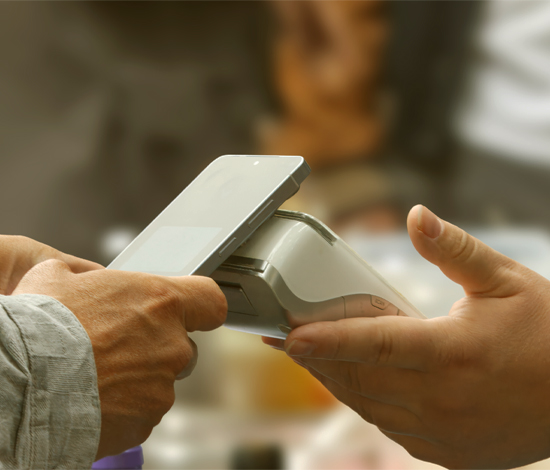

Understand the Risk Without Giving Up Contactless Payments
Tapping your card or phone at checkout has become part of everyday life. It takes seconds, and you never have to hand your card to a cashier. That convenience can also create opportunities for scammers.
Ghost tapping is a type of contactless payment fraud in which someone attempts to use tap-to-pay technology to make an unauthorized charge or mislead you about the amount you are approving.
You do not need to stop using contactless payments. Paying attention to the terminal and regularly monitoring your accounts can help you identify suspicious activity quickly.
Metro Credit Union members also have access to account alerts, card controls and other online banking tools that can help them monitor card activity and respond when something does not look right.
What Is Ghost Tapping?
Ghost tapping involves near-field communication, or NFC. NFC is the short-range technology that allows contactless cards, smartphones and other devices to communicate with a payment terminal.
In some reported scams, a fraudster carrying a portable payment device attempts to get close enough to a tap-enabled physical card to initiate a transaction. Other scams rely on deception rather than proximity. Someone posing as a vendor, seller or charity collector may ask you to tap without clearly showing the amount being charged.
A person may believe they approved a small purchase or donation, then later discover that the terminal processed a different amount. A scammer may also attempt a small unauthorized charge in hopes that it will go unnoticed.
How Ghost Tapping Scams Happen
Crowded Places Create Opportunities
Festivals, airports, public transportation, shopping areas and other busy locations allow people to get close without immediately drawing attention. A scammer may use the crowd as cover while carrying a portable card reader or contactless payment device.
A Seller Hides the Transaction Details
A scammer may pose as a legitimate vendor or charity collector and ask you to tap your card or phone. They may cover the terminal screen, enter a different amount or avoid providing a receipt.
Do not complete a contactless payment if you cannot see the amount and merchant information.
Pressure Keeps You From Checking
A seller may immediately hold out a terminal or rush you to complete the transaction. The pressure gives you less time to review the total or notice that something is wrong.
Slow down and confirm the amount before placing your card or phone near the terminal.
Tap-to-Pay Is Still a Secure Payment Option
Contactless payments use security features designed to protect your card information, and NFC technology only works over a short distance.
Mobile wallets add another layer of protection. Apple Pay and Google Pay generally require device authentication, such as a passcode, fingerprint or facial recognition, before completing standard payments. Mobile wallets also use security technology that helps prevent merchants from receiving your physical card number during a transaction.
Someone simply standing near your phone cannot complete a standard mobile wallet payment without the authentication required by the device.
Physical contactless cards work differently, and some transactions may not require a PIN. Keep the card secure and check the transaction amount before tapping.

Warning Signs of a Tap-to-Pay Scam
Watch for:
- A small purchase you do not recognize
- A charge from an unfamiliar merchant name
- An unexpected transaction after a crowded event or public gathering
- A seller who will not show you the amount before asking you to tap
- Someone insisting that contactless payment is your only option
- A merchant who pressures you to complete the transaction
- A transaction alert for a purchase you did not make
Do not dismiss an unfamiliar charge because the amount is small. Review the merchant information and your recent purchases to make sure you recognize it.
How to Protect Yourself From Ghost Tapping
Check the Screen Before You Tap
Look at the amount and merchant information before moving your card or phone near the terminal. If you cannot see the screen, ask the seller to show it to you.
Do not complete the transaction if the amount is wrong, the terminal looks suspicious or the seller refuses to let you review the payment.
Turn On Account and Transaction Alerts
Metro members can customize account alerts through online banking and the Metro mobile app. Depending on their preferences, members can receive notifications about purchases, balances, deposits and other account activity.
These notifications can help you notice unfamiliar transactions sooner. Learn how to set up and use Metro account alerts.
Metro also uses a Fraud Alert Service for suspicious card activity. If Metro flags a card transaction, you may receive a text asking whether you made the purchase.
Metro will not call and ask you to provide sensitive information or send a text directing you to click a link to verify your account.
Use Metro Card Controls
Metro’s Card Controls let you manage eligible debit cards and credit cards through online banking or the mobile app. You can freeze or unfreeze a card, monitor transactions and take other card-management actions from your account.
If you see a transaction you do not recognize or misplace your card, freezing it can help prevent additional card activity while you contact Metro.
Secure Your Phone
Use a strong passcode and turn on fingerprint or facial recognition when your device supports it. These security features make it harder for someone else to authorize a payment from your mobile wallet.
Review Your Accounts Regularly
Check your recent transactions throughout the month and investigate anything you do not recognize. Metro’s online and mobile banking make it easy to review your account activity from your phone or computer.
You can also read Metro's guide on why you should regularly check your account statement for more ways to catch errors and suspicious transactions.
What To Do If You See an Unfamiliar Charge
Act quickly if you see a debit or credit card transaction you did not make.
Start by checking the merchant name and your recent purchases. The name that appears on your statement may differ from the name you recognize from the store.
If you still do not recognize the transaction:
- Freeze or block the affected card through Metro’s Card Controls
- Contact Metro using a trusted phone number, the official Metro website or mobile app.
Do not provide account information, passwords or verification codes in response to an unexpected call or text.
A scammer may contact you after an unauthorized charge and pretend to represent your financial institution. Always start the conversation through an official channel you trust.
How to Report Fraud to Metro Credit Union
If you believe you have been a victim of fraud or see an unauthorized transaction on your Metro account, contact us as soon as possible.
- By Phone: 402.551.3052
- In Person: Visit a Metro Credit Union branch
- Online: Use the secure Message Center through the Metro Credit Union app or website
- Outside regular business hours: Contact Card Services at 800.880.5076
Stay Alert and Keep Control of Your Accounts
Tap-to-pay makes everyday purchases faster. Before tapping, take a moment to confirm the amount and merchant information shown on the terminal.
Keep transaction alerts turned on and review unfamiliar activity. If something does not look right, use Metro’s Card Controls to freeze or block the card and contact Metro through an official channel.
Talk with family members who may be less familiar with contactless payments. Show them how to review the amount before tapping, recognize an unfamiliar transaction and contact Metro safely.
Visit Metro Credit Union’s Fraud Protection Center for scam warnings, fraud prevention resources and information about reporting suspicious activity.
Frequently Asked Questions About Ghost Tapping
Can someone charge my card without physically touching it?
Yes, some consumer fraud reports have described attempts to charge tap-enabled physical cards without the cardholder intentionally tapping the card.
Contactless cards communicate with NFC readers only at very short range, so the card generally must be close to the payment device for a transaction attempt to occur.
Because of the limited operating distance, proximity remains a key factor in these reported scams.
Can someone ghost tap my phone while it is in my pocket?
Usually no. A locked smartphone normally requires user authentication before completing a standard mobile-wallet payment.
Apple Pay and Google Pay generally require Face ID, Touch ID, a passcode or another approved authentication method before payment information is transmitted.
Simply standing near a locked phone is not the same as authorizing a standard mobile-wallet transaction.
Should I stop using tap-to-pay?
No. Most people can continue using tap-to-pay safely when they verify payment amounts and monitor account activity.
Contactless payments use security features designed to protect card information and are widely used for everyday purchases.
To reduce risk, use trusted payment terminals, verify the amount before tapping and enable transaction alerts whenever available.
Is inserting my card safer than tapping it?
Not necessarily. Both chip payments and contactless payments use modern payment-security technology.
The more important factor is whether you trust the merchant and payment terminal.
If a terminal appears suspicious or a seller refuses to show the transaction amount, do not complete the purchase.
What should I do if I notice a small charge I do not recognize?
Do not ignore it. Review the charge immediately and contact your financial institution if you cannot identify the transaction.
Start by checking the merchant name and comparing the charge to your recent purchases.
If you still do not recognize the transaction, freeze or block the affected card and contact Metro Credit Union as soon as possible.